Creating a new Clue Plugin
This document will walk you through developing, publishing and deploying a new Clue plugin.
Development Environment Setup
Installing poetry
pip install poetry
cd clue-api
poetry install --with dev,test --all-extras

# OPTIONAL: Instead pre-commit hooks (black/flake8/isort formatting)
poetry run pre-commit install

# Now you can run the clue server!
poetry run server
Useful Commands
To activate a venv, use poetry shell.
To add a new dependency, use poetry add:
➜  clue-api git:(poetry) poetry add pyjwt
Using version ^2.8.0 for pyjwt

Updating dependencies
Resolving dependencies... (0.5s)

Package operations: 1 install, 0 updates, 0 removals

  - Installing pyjwt (2.8.0)

Writing lock file
Then commit the new pyproject.toml and poetry.lock.
Setup Clue Folders and Configuration
# Clue config.yml should be in this location, as well as classification.yml
# For a starter config, use the test config.yml and classification.
sudo mkdir -p /etc/clue/conf
# Log file directory, will write log files here if enabled
sudo mkdir -p /var/log/clue

sudo chown -R $USER /etc/clue
sudo chown $USER /var/log/clue
Creating the plugin
The easiest way to create a plugin is to use the Interactive Wizard. This script can be found at plugins/setup/create.py Simply run the python script and it will prompt you for required info:
python plugins/setup/create.py
Interacting with the central API
Request Initiation
Various client applications can make requests to the central API, which will in turn proxy requests to every relevant registered plugin.
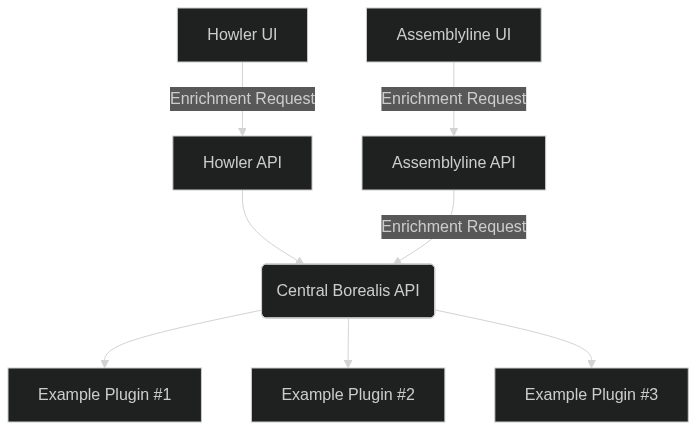
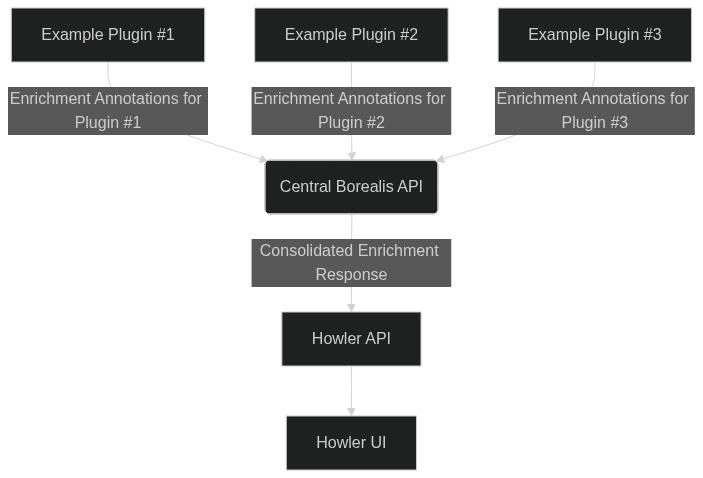
Response
The responses from each plugin are then merged together and returned with some metadata to the client application.
Valid Plugin Operations
Enrichment
Enrichments are a bread and butter of Clue. This entails the user requesting enrichment information about a given selector by making a network call to the central API, like this:
# Enriching a single selector
res = requests.get(
    f"{host}/api/v1/lookup/enrich/ip/127.0.0.1",
    params={"max_timeout": 2.0},
    headers={"Authorization": f"Bearer {access_token}"},
)

# Bulk enrichment of selectors
bulk_req = [{"type": "ip", "value": "127.0.0.1"}, {"type": "ip", "value": "127.0.0.2"}]

res = requests.post(
    f"{host}/api/v1/lookup/enrich",
    params={"max_timeout": 5.0, "sources": "test|bad"},
    headers={"Authorization": f"Bearer {access_token}"},
    json=bulk_req,
)
For a single enrichment, the response body will be a QueryResult:
QueryResult Example
{
  "type": "ip",
  "value": "127.0.0.1",
  "source": "example_plugin",
  "error": null,
  "items": [
    {
      "classification": "TLP:CLEAR",
      "count": 23,
      "link": "https://example.com/moreinfo",
      "annotations": [
        {
          "analytic": "Assemblyline",
          "analytic_icon": "material-symbols:sound-detection-dog-barking",
          "author": null,
          "quantity": 10,
          "version": "1.0.0",
          "timestamp": "2024-12-16T12:54:26.374945+00:00",
          "type": "context",
          "value": "suspect",
          "confidence": 0.0,
          "severity": 0.0,
          "priority": 50.0,
          "summary": "Example summary of the information in this Annotation",
          "details": "# Here's some annotation details\\n\\nIt's very interesting",
          "link": "https://example.com/annotation",
          "icon": null,
          "ubiquitous": true
        },
        {
          "analytic": "Howler",
          "analytic_icon": null,
          "author": null,
          "quantity": 10,
          "version": "v0.0.1",
          "timestamp": "2024-12-30T12:54:26.374940+00:00",
          "type": "context",
          "value": "benign",
          "confidence": 1.0,
          "severity": 1.0,
          "priority": 50.0,
          "summary": "Example summary of the information in this Annotation",
          "details": null,
          "link": "https://example.com/annotation",
          "icon": null,
          "ubiquitous": true
        },
        {
          "analytic": "Assemblyline",
          "analytic_icon": null,
          "author": "John Smith",
          "quantity": 25,
          "version": "1.0.0",
          "timestamp": "2024-12-30T12:54:26.374940+00:00",
          "type": "mitigation",
          "value": 42.0,
          "confidence": 0.0,
          "severity": 0.5,
          "priority": 50.0,
          "summary": "Example summary of the information in this Annotation",
          "details": "# Here's some annotation details\\n\\nIt's very interesting",
          "link": null,
          "icon": null,
          "ubiquitous": false
        }
      ],
      "raw_data": {
        "id": 1,
        "raw_field": "some_data"
      }
    },
    {
      "classification": "TLP:CLEAR",
      "count": 9,
      "link": null,
      "annotations": [
        {
          "analytic": "Howler",
          "analytic_icon": "material-symbols:sound-detection-dog-barking",
          "author": null,
          "quantity": 10,
          "version": null,
          "timestamp": "2024-12-16T12:54:26.374945+00:00",
          "type": "frequency",
          "value": 42.0,
          "confidence": 0.5,
          "severity": 0.0,
          "priority": 50.0,
          "summary": "Example summary of the information in this Annotation",
          "details": null,
          "link": "https://example.com/annotation",
          "icon": null,
          "ubiquitous": true
        },
        {
          "analytic": null,
          "analytic_icon": null,
          "author": "John Smith",
          "quantity": 25,
          "version": "v0.0.1",
          "timestamp": "2024-12-30T12:54:26.374940+00:00",
          "type": "context",
          "value": "Involved in Operation Cat",
          "confidence": 1.0,
          "severity": 0.5,
          "priority": 1.0,
          "summary": "Example summary of the information in this Annotation",
          "details": null,
          "link": "https://example.com/annotation",
          "icon": null,
          "ubiquitous": false
        }
      ],
      "raw_data": [
        {
          "id": 1,
          "other_data": "example",
          "other_row": 45
        }
      ]
    },
    {
      "classification": "TLP:CLEAR",
      "count": 23,
      "link": "https://example.com/moreinfo",
      "annotations": [
        {
          "analytic": "Howler",
          "analytic_icon": null,
          "author": "John Smith",
          "quantity": 25,
          "version": "v0.0.1",
          "timestamp": "2024-12-30T12:54:26.374940+00:00",
          "type": "context",
          "value": "Involved in Operation Cat",
          "confidence": 1.0,
          "severity": null,
          "priority": 1000.0,
          "summary": "Example summary of the information in this Annotation",
          "details": null,
          "link": null,
          "icon": null,
          "ubiquitous": false
        },
        {
          "analytic": null,
          "analytic_icon": null,
          "author": null,
          "quantity": 25,
          "version": null,
          "timestamp": "2024-12-16T12:54:26.374945+00:00",
          "type": "frequency",
          "value": 42.0,
          "confidence": 0.0,
          "severity": null,
          "priority": 1000.0,
          "summary": "Example summary of the information in this Annotation",
          "details": "# Here's some annotation details\\n\\nIt's very interesting",
          "link": null,
          "icon": null,
          "ubiquitous": true
        }
      ],
      "raw_data": {
        "id": 1,
        "raw_field": "some_data"
      }
    }
  ],
  "maintainer": null,
  "datahub_link": "https://example.com/datahub",
  "documentation_link": null,
  "latency": 1470
}
A bulk enrichment will return the data in a dict of dicts of a list of QueryResults, where the first key is the type
and the second key is the value:
{
    "ip": {
        "127.0.0.1": [
            // See above for a full query result example
            {
                "type": "ip",
                "value": "127.0.0.1",
                "source": "example_plugin",
                ...
            }
        ]
    }
}
However, this formatting is handled by the central API and the Clue plugin for the most part.
Actions
Actions are operations a plugin can perform on either a single or several selectors. For example, an action could add a selector to a database somewhere for tracking purposes, return a markdown summary of refined results for a set of selectors, or any other arbitrary action. Clue only enforces the format of the response - there are no restrictions on what an action can do.
In order to execute an action, the user must send an execution request to the central API:
res = requests.post(
    f"{host}/api/v1/actions/execute/example/example_action",
    params={"max_timeout": 2.0},
    headers={"Authorization": f"Bearer {access_token}"},
    json={"selector": {"type": "ip", "value": "127.0.0.1"}, "other_choice": "b"},
)
You'll note the additional field provided. We will explain that next.
Additional Parameters
Clue plugins that expose an action can request additional parameters from the user in order to provide context of the action request to the plugin. These parameters can be declared on the plugin side, and the Clue UI library will handle gathering the additional parameters.
Additional parameters are specified using Python Generics and class inheritance. Here is an example corresponding to the above request:
class Params(ExecuteRequest):
    other_value: Optional[str] = Field(description="Another field you should show", default="")
    choice: ChoiceEnum = Field(default=ChoiceEnum.a, description="Another choice for you")
    other_choice: ChoiceEnum = Field(description="Another choice for you with no default")

plugin = CluePlugin(
    ...,
    actions=[
        Action[Params](
            id="test_action",
            action_icon="codicon:terminal",
            name="Test Action",
            classification="TLP:CLEAR",
            summary="Tester",
            supported_types={"ip", "port", "sha256"},
            accept_multiple=True,
        )
    ]
)
Note that parameters can be marked as optional, as is shown above - only other_choice is fully required.
Action Results
In order to notify the user on the outcome of the action, actions are expected to return an ActionResult model. This
allows for a short description of the outcome, the output of the action (along with a format) as well as a status enum:
failed_example = ActionResult(
    outcome="failure",
    summary="Action failed.",
    format="markdown",
    output=textwrap.dedent(
        f"""
        # Action Failed

        Retaining your data was unsuccessful for an unknown reason.

        ## Error Message:

        {str(e)}
        """.strip()
    ),
)

success_example = ActionResult(
    outcome="success",
    summary="Action Completed Successfully",
    format="json",
    output={
        "example": "result"
    },
    link=Url("http://example.com"),
)
Fetchers
Fetchers are a way for plugins to return data to the client to be displayed based on a selector. This data can be returned in any support format - currently:
- Markdown
- Json
- Images
Fetchers function similarly to actions, except no additional information can be provided. Below is an example of a fetcher implementation:
def run_fetcher(fetcher: FetcherDefinition, selector: Selector, access_token: str | None) -> FetcherResult:
    "Fetch a rendering of the given email"
    try:
        if not access_token:
            return FetcherResult(outcome="failure", format="error", error="Missing access token.")

            # work here

            return FetcherResult(
                outcome="success",
                format="image",
                data=ImageResult(
                    image=f"data:image/png;base64,{base64.b64encode(image_data).decode("utf-8")}",
                    alt=f"Rendering of an image to do with the given selector",
                ),
            )
    except Exception as e:
        logger.exception("Error in run_fetcher")
        return FetcherResult.error_result(repr(e))

plugin = CluePlugin(
    ...,
    run_fetcher=run_fetcher,
)